Showing posts with label Simlets. Show all posts

Monday, July 6, 2015

EIGRP Sim

Refer to the topology.
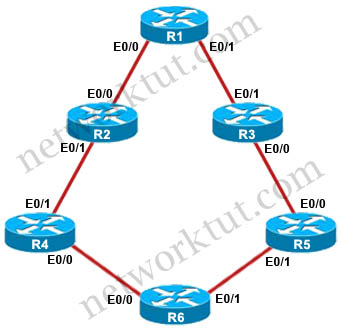
EIGRP_Topology.jpg
You have been brought in to troubleshoot an EIGRP network. A network engineer has made configuration changes to the network rendering some locations unreachable. You are to locate the problem and suggest solution to resolve the issue.
Question 1
R5 has become partially isolated from the remainder of the network. R5 can reach devices on directly connected networks but nothing else. What is causing the problem?
A. An outbound distribute list in R3
B. Inbound distribute lists in R5
C. An outbound distribute list in R6
D. Incorrect EIGRP routing process ID in R5

Answer: B
Explanation
R5_show_run_router_eigrp.jpg
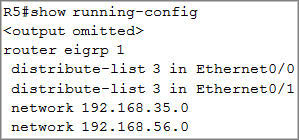
R5 is using distribute-lists (with access-list 3) to filter traffic coming from E0/0 & E0/1. Therefore we continue checking access-list 3:
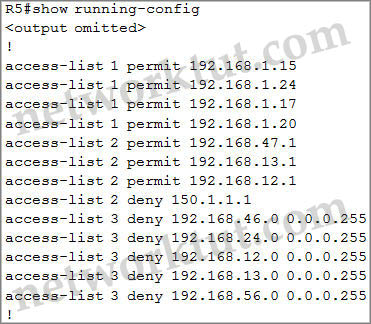
R5_show_run_access-list.jpg
There is no “permit” line in access-list 3 so all traffic is dropped because each access-list always has an implicit “deny all” statement at the end -> R5 cannot learn any routes advertised via EIGRP -> only directly connected will be in the routing table of R5.
Question 2
You have resolved the initial issue between routers R2 and R4, but another issue remains. You are to locate the problem and suggest solution to resolve the issue. The customer has disabled access to the show running-config command.
The network segment between R2 and R4 has become disconnected from the remainder of the network. How should this issue be resolved?
A. Change the autonomous system number in the remainder of the network to be consistent with R2 and R4.
B. Move the 192.168.24.0 network to the EIGRP 1 routing process in R2 and R4.
C. Enable the R2 and R4 router interfaces connected to the 192.168.24.0 network.
D. Remove the distribute-list command from the EIGRP 200 routing process in R2.
E. Remove the distribute-list command from the EIGRP 100 routing process in R2.

Answer: B
Explanation
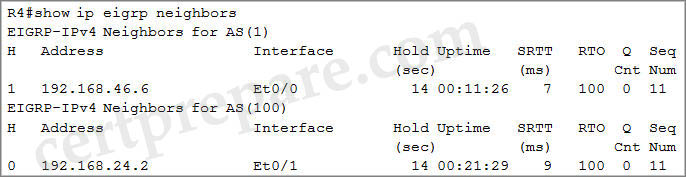
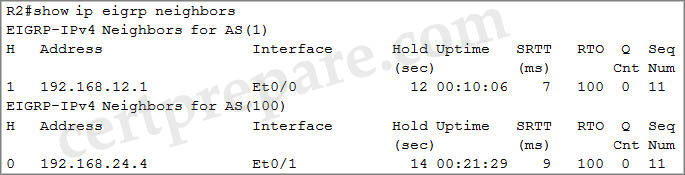
Check on R2 & R4 with the “show ip eigrp neighbors” command (or maybe the “show ip eigrp interfaces” command also works for this sim):
R2_show_ip_eigrp_neighbors.jpg
R4_show_ip_eigrp_neighbors.jpg
We see the segments R1 – R2; R4 – R6 are running EIGRP AS 1 while the segment R2 – R4 is running EIGRP AS 100 -> These segments cannot see each other. Therefore we have move the segment R2 – R4 to EIGRP AS 1.
OSPF Sim

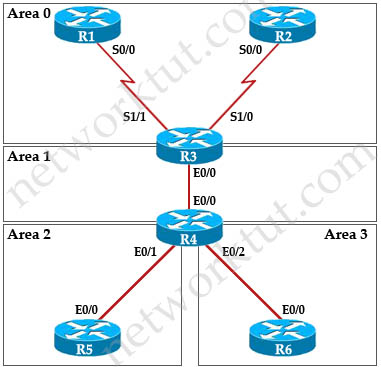
A customer network engineer has edited their OSPF network configuration and now your customer is experiencing network issues. They have contacted you to resolve the issues and return the network to full functionality.
OSPF.jpg
Question 1
The OSPF neighbor relationship has been lost between R1 and R3. What is causing this problem?
A. The serial interface in R1 should be taken out of the shutdown state.
B. A neighbor statement needs to be configured in R1 and R3 pointing at each other.
C. The R1 network type should be changed to point-to-multipoint non-broadcast.
D. The hello, dead and wait timers on R1 need to be reconfigured to match the values on R3.

Answer: C
Explanation
Check the ports connecting between R1 and R3 via the “show running-config” command:
R1#show running-config
<<output omitted>>
interface Serial0/0
ip address 192.168.13.1 255.255.255.0
ip ospf network non-broadcast
R3#show running-config
<<output omitted>>
interface Serial1/1
ip address 192.168.13.3 255.255.255.0
ip ospf network point-to-multipoint non-broadcast
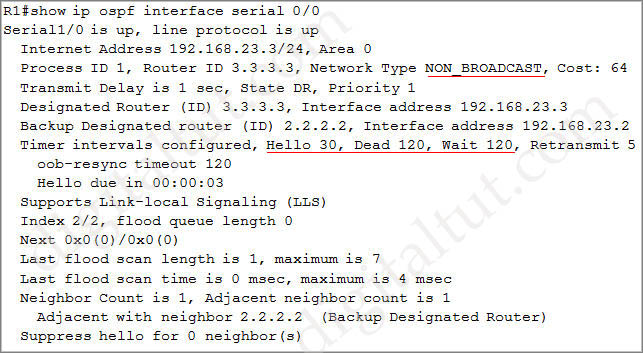
Or you can check these interfaces via the “show ip ospf interface S0/0″ on R1 or “show ip ospf interface S1/1″ on R3 you will see the Network types are “NON_BROADCAST” or “POINT_TO_MULTIPOINT”, respectively. For example:
R1_show_ip_ospf_interface_serial.jpg
Question 2
Connectivity from R3 to R4, R5 and R6 has been lost. How should connectivity be reestablished?
A. Configure R4 with a virtual link to 192.168.13.2
B. Change the R3 and R4 hello-interval and retransmit-interface timers to zero so the link won’t go down.
C. Add an OSPF network statement for 4.4.4.4 0.0.0.0 area 1 in R3
D. Add an OSPF network statement for 192.168.34.3 0.0.0.255 area 2 in R3
E. Add an OSPF network statement for 192.168.34.0 0.0.0.255 area 1 in R3

Answer: E
Explanation
We can check the OSPF neighborship on R3 first via the “show ip ospf neighbor” command:
R3_show_ip_ospf_neighbor.jpg
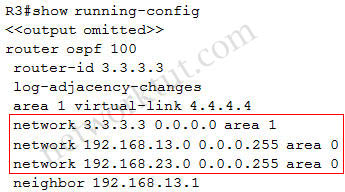
We don’t see the OSPF neighborship between R3 and R4 (neighbor 4.4.4.4) so something was wrong with OSPF. So we continue checking with the “show running-config” command and pay attention to the OSPF config between R3 and R4.
R3_show_running-config_missing_network.jpg
We can realize the link between R3 and R4 is not running OSPF (missing the command “network 192.168.34.0 0.0.0.255 area 1″).
Question 3
After resolving the issues between R3 and R4, Area 2 is still experiencing routing issues. Based on the current router configurations, what needs to be resolved for routes to the networks behind R5 to be seen in the company intranet?
A. Configure R4 and R5 to use MD5 authentication on the Ethernet interfaces that connect to the common subnet.
B. Configure Area 1 in both R4 and R5 to use MD5 authentication.
C. Add “ip ospf authentication-key 7 BEST” to the R4 Ethernet interface that connects to R5 and “ip ospf authentication-key 7 BEST” to R5 Ethernet interface that connects to R4.
D. Add “ip ospf authentication-key CISCO” to R4 Ethernet 0/1 and add “area 2 authentication” to the R4 OSPF routing process.

Answer: D
Explanation
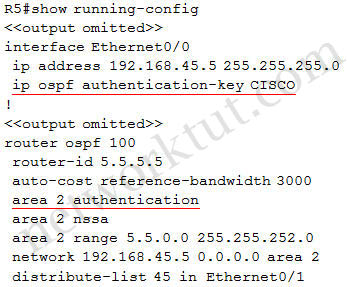
Check the configuration of R5 with the “show running-config” command:
R5_show_running-config_authentication.jpg
Interface E0/0 of R5 is configured with OSPF authentication so we should check the configuration on interface E0/0 of R4:
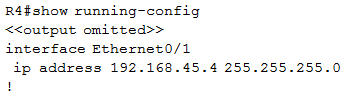
R4_show_running-config_no_authentication.jpg
There is no OSPF authentication under E0/1 of R4 so R4 cannot establish OSPF neighborship with R5.
Question 4
The 6.6.0.0 subnets are not reachable from R4. how should the problem be resolved?
A. Edit access-list 46 in R6 to permit all the 6.6.0.0 subnets.
B. Apply access-list 46 in R6 to a different interface.
C. Apply access-list 1 as a distribute-list out under router ospf 100 in R4.
D. Remove distribute-list 64 out on R6.
E. Remove distribute-list 1 in ethernet 0/1 in R4.
F. Remove distribute-list 1 in ethernet 0/0 in R4.

Answer: D
Explanation
Only the 6.6.0.0 subnets are not reachable from R4 so maybe something blocking it (OSPF neighborship is still formed between R4 and R6. You can verify with the “show ip ospf neighbor” command). Check the configuration of R6 with the “show running-config” command and pay attention to the OSPF part of R6:
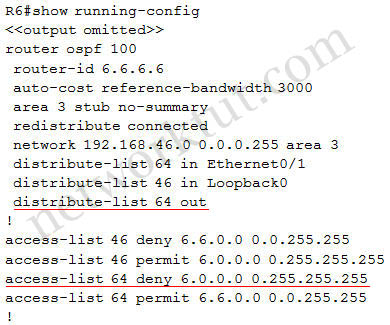
R6_show_running-config-distribute-list.jpg
From the output we learn that R6 is using distribute-lists to filter routes. Especially distribute-list 64 (note: 64 is the access-list number) is applied to:
+ Inbound direction on E0/1 (distribute-list 64 in Ethernet0/1): this distribute-list is no harm because it only prevents 6.0.0.0/8 prefix from learning back from E0/1. Notice that R6 can still advertise this prefix to the outside.
+ Outbound direction of all interfaces (distribute-list 64 out): this distribute-list is causing problem because it prevents 6.0.0.0/8 prefix from advertising to the outside ->R4 does not know how to reach 6.6.0.0 subnets. To fix this problem we should remove “distribute-list 64 out” on R6.
Note: Although the next line of this distribute-list allows prefix 6.6.0.0/16 but traffic for this prefix can never reach this line because the above line “access-list 64 deny 6.0.0.0 0.255.255.255″ is always matched first and this prefix is dropped.

HSRP Sim

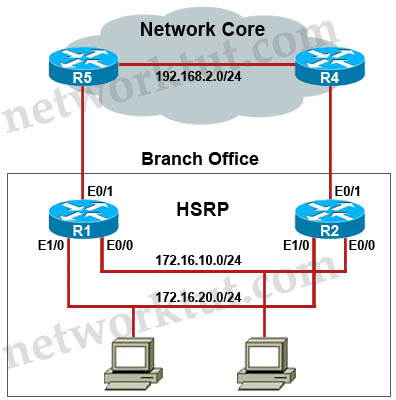
You have been asked by your customer to help resolve issues in their routed network. Their network engineer has deployed HSRP. On closer inspection HSRP doesn’t appear to be operating properly and it appears there are other network problems as well. You are to provide solutions to all the network problems.
HSRP_Topology.jpg
Question 1
You have received notification from network monitoring system that link between R1 and R5 is down and you noticed that the active router for HSRP group 1 has not failed over to the standby router for group 1. You are required to troubleshoot and identify the issue.
A. There is an HSRP group track command misconfiguration
B. There is an HSRP group priority misconfiguration
C. There is an HSRP authentication misconfiguration
D. There is an HSRP group number mismatch
E. This is not an HSRP issue; this is routing issue.

Answer: A
Explanation
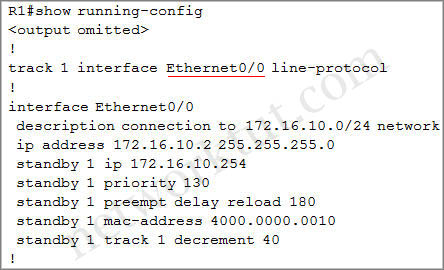
Check the configuration of R1 with the “show running-config” command:
R1_show_run_track.jpg
R1 connects to R5 via E0/1 interface but R1 is tracking E0/0 which connects to R2 -> when the link between R1 & R5 fails the HSRP priority of R1 is still the same. To correct this problem we have to change the tracking interface to E0/1.
Question 2
The following debug messages are noticed for HSRP group 2. But still neither R1 nor R2 has identified one of them as standby router. Identify the reason causing the issue.
Note: only show commands can be used to troubleshoot the ticket.
R1#
‘Mar 26 11:17:39.234: HSRP: Et1/0 Grp 2 Hello out 172.16.20.2 Active pri 100 vIP 172.16.20.254
‘Mar 26 11:17:40.034: HSRP: Et0/0 Grp 1 Hello out 172.16.10.2 Active prj 130 vIP 172.16.10.254
R1#
‘Mar 26 11:17:40.364: HSRP: Et0/0 Grp 1 Hello in 172.16.10.1 Standby pri 100 vIP 172.16.10.254
R1#
‘Mar 26 11:17:41.969: HSRP: Et1/0 Grp 2 Hello out 172.16.20.2 Active pri 100 vIP 172.16.20.254
‘Mar 26 11:17:42.719: HSRP: Et0/0 Grp 1 Hello out 172.16.10.2 Active pri 130 vIP 172.16.10.254
‘Mar 26 11:17:42.918: HSRP: Et0/0 Grp 1 Hello in 172.16.10.1 Standby pri 100 vIP 172.16.10.254
R1#
‘Mar 26 11:17:44.869: HSRP: Et1/0 Grp 2 Hello out 172.16.20.2 Active pri 100 vIP 172.16.20.254
‘Mar 26 11:17:45.485: HSRP: Et0/0 Grp 1 Hello out 172.16.10.2 Active pri 130 vIP 172.16.10.254
‘Mar 26 11:17:45.718: HSRP: Et0/0 Grp 1 Hello in 172.16.10.1 Standby pri 100 vIP 172.16.10.254
R1#
‘Mar 26 11:17:47.439: HSRP: Et1/0 Grp 2 Hello out 172.16.20.2 Active pri 100 vIP 172.16.20.254
‘Mar 26 11:17:48.252: HSRP: Et0/0 Grp 1 Hello in 172.16.10.1 Standby pri 100 vIP 172.16.10.254
‘Mar 26 11:17:48.322: HSRP: Et0/0 Grp 1 Hello out 172.16.10.2 Active pri 130 vIP 172.16.10.254
R1#
‘Mar 26 11:17:50.389: HSRP: Et1/0 Grp 2 Hello out 172.16.20.2 Active pri 100 vIP 172.16.20.254
‘Mar 26 11:17:50.735: HSRP: Et0/0 Grp 1 Hello in 172.16.10.1 Standby pri 100 vIP 172.16.10.254
‘Mar 26 11:17:50.921: HSRP: Et0/0 Grp 1 Hello out 172.16.10.2 Active pri 130 vIP 172.16.10.254
R1#
‘Mar 26 11:17:53.089: HSRP: Et1/0 Grp2 Hello out 172.16.20.2 Active pri 100 vIP 172.16.20.254
‘Mar 26 11:17:53.338: HSRP: Et0/0 Grp 1 Hello out 172.16.10.2 Active pri 130 vIP 172.16.10.254
‘Mar 26 11:17:53.633: HSRP: Et0/0 Grp 1 Hello in 172.16.10.1 Standby pri 100 vIP 172.16.10.254
A. HSRP group priority misconfiguration
B. There is an HSRP authentication misconfiguration
C. There is an HSRP group number mismatch
D. This is not an HSRP issue: this is DHCP issue.
E. The ACL applied to interface is blocking HSRP hello packet exchange

Answer: E
Explanation
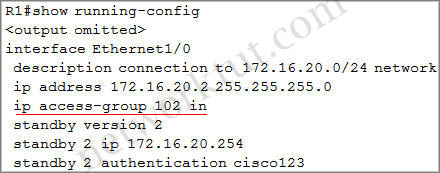
Check the link between R1 & R2 where HSRP group 2 is running (interface E1/0)
R1_show_run_access_list.jpg
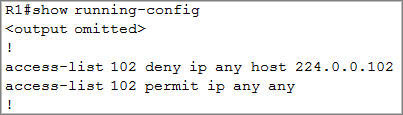
As we see R1 is using access-list 102 to filter traffic coming to interface E1/0 (inbound direction). Continue checking the access-list 102 of R1:
R1_show_run_access_list2.jpg
R1 is blocking any traffic send to 224.0.0.102. Notice that in the syntax of an access-list, the source address is always defined before the destination address. “224.0.0.102” is the muticast address which HSRP version 2 uses to send Hello packets to (instead of 224.0.0.2 of HSRP version 1). Therefore all HSRP sent from neighbor (R2 in this case) to R1 is dropped. R1 keeps sending HSRP Hello packets and think it is the active HSRP router.
Question 3
Examine the configuration on R4. The routing table shows no entries for 172.16.10.0/24 and 172.16.20.0/24. Identify which of the following is the issue preventing route entries being installed on R4 routing table?
A. HSRP issue between R4 and R2
B. This is an OSPF issue between R4 and R2
C. This is a DHCP issue between R4 and R2
D. The distribute-list configured on R4 is blocking route entries
E. The ACL configured on R4 is blocking inbound traffic on the interface connected to R2

Answer: D
Explanation
Checking what is preventing the two networks 172.16.10.0/24 & 172.16.20.0/24 from learning on R4.
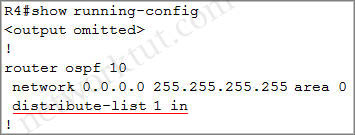
R4_show_run_distribute_list.jpg
There is a distribute-list applied on R4. Notice that a distribute-list is often used to control which routing updates should be sent or received on a router. So we should check what this distribute-list is used for. This distribute-list is based on access-list 1 so we will continue checking this access-list:
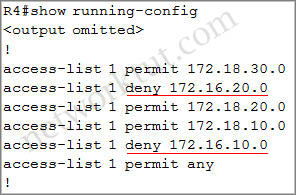
R4_show_run_access_list.jpg
This access-list explicitly blocks the two networks 172.16.10.0/24 & 172.16.20.0/24 from populating into R4 routing table.
Question 4
Examine the configuration on R5. Router R5 do not see any route entries learned from R4; what could be the issue?
A. HSRP issue between R5 and R4
B. There is an OSPF issue between R5 and R4
C. There is a DHCP issue between R5 and R4
D. The distribute-list configured on R5 is blocking route entries
E. The ACL configured on R5 is blocking traffic for the subnets advertised from R4.

Answer: B or D
Explanation
We don’t have enough information to solve this question. But check the OSPF neighbor between R4 and R5 via the command “show ip ospf neighbors” we will not see any entries so we can conclude there is a OSPF issue between R5 & R4 or a distribute-list configured on R5 is blocking the multicast address of OSPF (224.0.0.5 & 224.0.0.6) so you should check the configs of R4 & R5 carefully.

Labels